This probe has no driver
Windows sees the probe, but no WinUSB driver is bound to it, so pyOCD cannot open it. The probe and the cable are fine.
PROBE_DRIVER_MISSING
Symptoms
- The probe is listed in MCUHex greyed out and marked [no driver]; connecting says the probe has no driver.
- Device Manager shows the probe with a warning mark, as "STM32 STLink" or "ST-Link Debug".
- pyOCD-based tools report no probes at all, while the probe’s LED is on.
Likely causes
- Windows has no driver for a debug probe out of the box. MCUHex opens the probe through libusb, which only sees an interface bound to WinUSB; a probe bound to nothing never reaches it.
- A stand-alone ST-Link V2 dongle and the ST-Link on a Nucleo or Discovery board both arrive like this on a machine without ST’s tools.
How to fix it
-
Bind the probe to WinUSB with Zadig
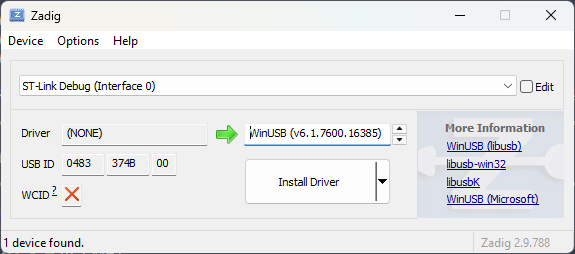
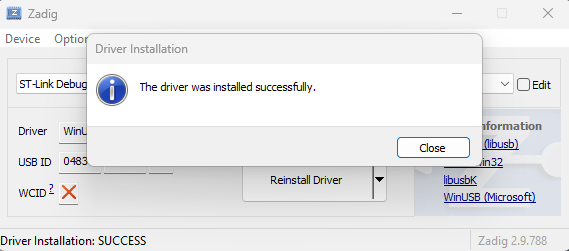
Open Zadig with the probe plugged in. It lists the probe by itself (USB ID 0483); pick it, make sure the target driver reads WinUSB, click Install Driver, then replug. If STM32CubeIDE or STM32CubeProgrammer is installed you can skip this — their driver already does it. A J-Link is different: install SEGGER’s J-Link Software Pack instead.
Download Zadig ↗SEGGER J-Link Software Pack ↗
-
Replug and refresh
Unplug the probe, plug it back in and click the refresh icon next to the device list. The row turns from greyed out to selectable and connects.